Pages

Subscribe:

Ads 468x60px

Social Icons

Showing posts with label Search-Engines. Show all posts

Tuesday, September 4, 2012

How to Improve Your Site's Search Ranking Using SEO


As any website owner knows, search-engine optimization—SEO—is a rapidly moving target. What worked well last week might work against you today. Hordes of website operators learned this the hard way earlier this year, when two key updates to Google’s algorithms took effect. Known by the cute code names of “Panda” and “Penguin,” these updates were designed to severely penalize websites with thin, weak, or duplicated content. The goal: To rid Google’s search results of content farms and spam blogs by using quality metrics, instead of merely relying on the old PageRank system to measure a site’s importance.


The end result has been to force webmasters to do what pros have been advising for years: Stop stuffing keywords into low-grade copy and focus on quality. Unique blogs, images, and video are all increasingly key in today’s Web world.
Of course, more and more scenery, so to speak, accompanies this mandate. Google+ might not yet matter much to most individuals, but it’s becoming more important to search engines, along with Facebook and Twitter links to content. How your site looks and loads on a mobile browser is also increasingly important, as search results are ever more accessed via smartphone.
All of that is merely prologue: If you’re not already working on all of the above, you’re far, far behind. For those already following this advice, now is the time to take a look ahead at what the next 18 months of SEO are likely to bring. We spoke to dozens of experts to get the skinny on SEO for 2013. Here are the top tips we discovered.

This Website Will Disavow Any Knowledge of Your Actions
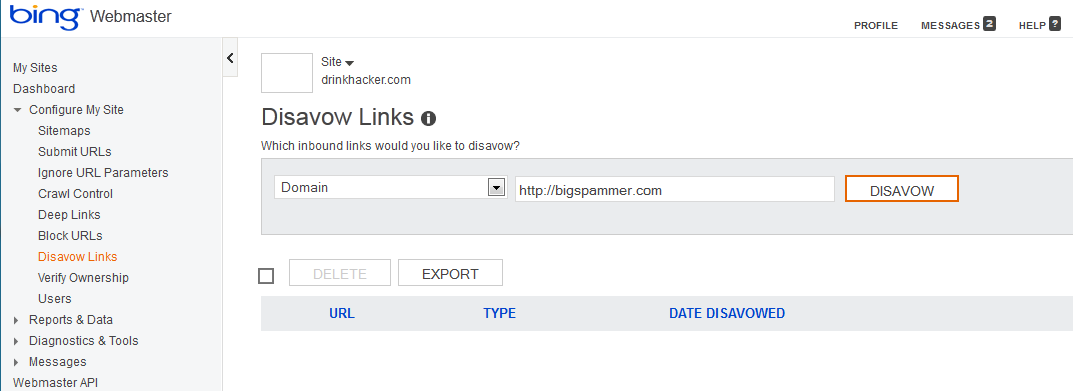
How to Improve Your Site's Search Ranking using SEOUse this tool to prevent Bing from penalizing your site if spammy sites link to it.
What happens if someone links to you from a spammy website? It makes you look bad; in fact, search engines can deem that your site is in fact a spam site as well. Your site is guilty by association, even if you have nothing to do with the linker.

Bing has rolled out a tool in its Webmaster Tools that let you “disavow” links from such places. It’s largely self-explanatory. Just add a page or domain to the tool and click the Disavow button to tell Bing you do not approve. This may improve your site's position in search results, but almost certainly it will help to rid the Web of some of its spam. Google’s “disavow” tool is expected in the coming months.
Carson Ward of Distilled.net (one of several online marketing agencies whose experts we interviewed) says these "disavow" tools will raise a lot of questions for search optimizers. “Will site owners be more likely to use tactics that search engines frown on if they can simply turn and tell search engines to discount the spam they have created? Will search engines trust site owners to crowdsource spam detection, and should they? Google's implementation of a disavow tool will largely determine the future of Web spam.”

It’s Not Where They Link, It’s How They Link

Ryan Draving, CEO of CompeteLeap, stresses that machine-generated writing and “spinning” (rewriting or slightly changing someone else’s content to look original) will become useless or even detrimental to your website, adding, “Search results will begin to shift more and more toward brands, and away from websites built purely for SEO. Brands typically invest in the kind of quality content that generates strong links from, and engagement with, bloggers, other websites, and users on social media networks.”
Those incoming links are still critical, but Draving notes that over-reliance on exact keyword phrases coming into your site (like “Chicago emergency plumber”) will penalize you. Says Draving, “Keep less than 11 percent of external links coming to your website via exact keyword phrases. Google expects to see either your URL or your company name as the link text for the majority of your inbound links. So instead of asking every website to link to you with your favorite keywords ('DIY Internet Marketing'), allow them to use the text they want.”

Don’t Discount Yahoo

It’s long been a habit for website operators to forget about Yahoo, even though Yahoo and Bing combined still have nearly a 30 percent market share. But what happens now in the Marissa Mayer era? Will Yahoo rise again as a search leader? Kaysha Kalkofen, co-founder of tSunela, says, “Keep an eye on Yahoo's relationship with Bing, especially in the paid search space. If that evolves, the paid search market will open up again.”

Take the Credit
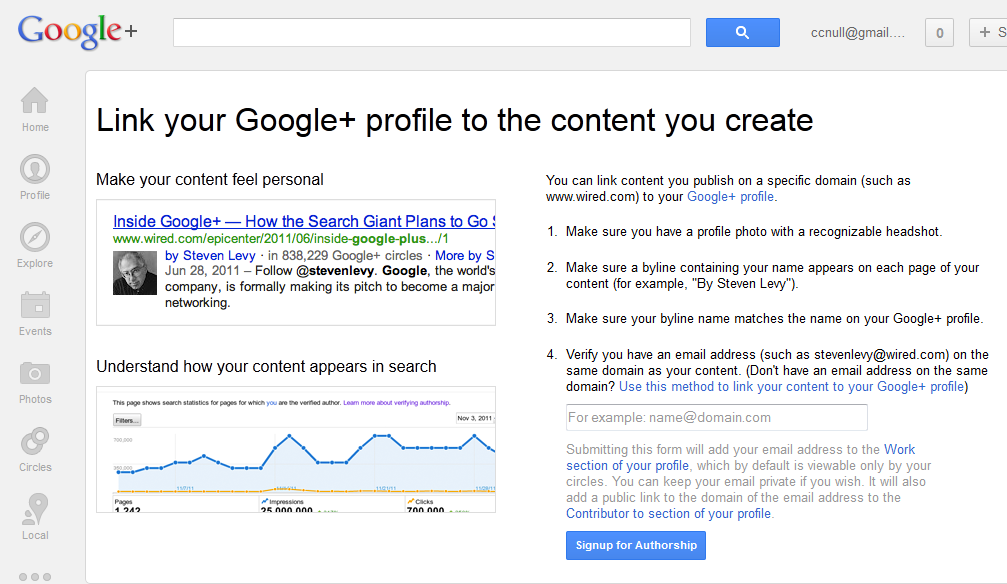
How to Improve Your Site's Search Ranking using SEOAuthor rankings could become more important than page rankings in the second half of 2013.
Have you ever done a Google search and noticed head shots next to a few of the posts at the top of the results? This is part of an experimental program within Google designed to link authors with published content, regardless of where that content lives.

Jon Payne, President and Founder of Ephricon Web Marketing, explains how “AuthorRank” works: “It’s generally the case that most significant websites have many different authors that contribute to their content. Google is looking at how to trust links from one author versus another, and weight them differently. We see AuthorRank replacing PageRank most likely in the latter half of 2013. Businesses must set up the ability to claim authorship of their content, but the process is pretty easy and (not surprisingly) is mostly handled within Google+.” To get started with the process, get your Google+ profile up to snuff (you must have a recognizable face-shot photo as your profile picture) and check out plus.google.com/authorship.

Friday, July 20, 2012

A Look Into: Popular (Public) Site Ranking Services

A Look Into: Popular (Public) Site Ranking Services

By . Filed in Web 2.0
Google Analytics Survey4Qsurvey.com Learn how to make happier visitors: Add a 4Q survey to Google Analytics
There’s no denying that anyone who owns a blog in some way tracks the statistics and rankings of their site. After all, one has to measure growth somehow, one has to know if they’re on the right track of growth and prosperity.
popular site ranking services
One way of doing this is simply to check the statistics on your site, either through an integrated tracking system, or an external one like Google Analytics. While this gives you an overview of your traffic and visitors, it doesn’t give you a picture of how your site compares to others. This is where traffic analysis services like Compete.com and Alexa come in.
This article will cover the major players in the market of traffic analysis and ranking, and investigate how they operate, how and what kind of data they use to rank sites, and most importantly, their validity of their rankings. Full list at the click.

Ways of collecting traffic data

There are 3 major ways of collecting and estimating traffic for a website:
  • Track users with custom installed software (e.g. toolbars) and record the websites they visit, then use the data collectively to estimate how popular a given website is. The main problem with this method is that toolbars aren’t popular among users, especially tech savvy users, and the data is somewhat skewed towards the kind of people who would use the toolbars (the not-so-savvy Internet users). To make matters worse, some of the toolbars only work for certain browsers, while others are even classified as spyware/malware.
  • ISP data tracking. A more direct way is to collect vast amounts of data from ISPs and inspect what sites broadband users visit. This option is by far the most accurate, but it’s also the most limited due to privacy laws.
  • An internal ranking score based on different metrics, e.g. Google PageRank, which uses links and link quality to determine a site’s ranking.
Most web tracking services use a combination of the first two methods, while some are entirely based around one. Here’s a rundown of the most popular services, and how they operate.

Compete.com

Compete is a popular way of measuring traffic, and has been in operation since 2000. Compete uses traffic from users with its Compete Search bar installed to rank sites and estimate traffic, in addition to data from ISPs and other metrics. Compete also offers several paid services, including search analytics that compares site keywords.
compete
Like any traffic service, Compete.com’s rankings are as trustworthy as the data they have, which in their case is compiled from several sources, including a toolbar, data from ISPs, and online surveys. Because data is compiled and estimated from several sources, it’s prone to be less biased than if it was compiled from only one source, e.g. a toolbar.

Alexa

Alexa, founded back in 1996, and now owned by Amazon, gathers data from only one source: its toolbar for Internet Explorer and plugins for Firefox and Google Chrome, and the ranks of website are calculated on a 3-month basis. Throughout these years it has become so popular that many advertisers and webmasters use it to estimate traffic.
alexa
As Alexa ranks websites based on only one data source, it is often cited as vastly inaccurate compared to other tracking services, and rightfully so. Alexa only uses one source of data, and that data is entirely based on whether the user has a toolbar installed, but some anti-virus applications even classify the Alexa toolbar as malware.
Finally, Alexa ranks are calculated on a 3-month basis, which is a relatively long time, especially in a fast growing online world. Despite all this, Alexa is used by many bloggers to rank sites, and is popular among advertisers to estimate traffic of websites.

comScore

comScore gathers data from a selected group of users who have comScore monitoring software installed on their systems, which tracks their website visits and activity. So far, over 2 million people send data to comScore, which uses it to create traffic rankings and estimates for marketing purposes (e.g. selling the data to large advertisers and researchers). Though its rankings and data are commercially available only, it’s popular among advertising agencies and online market researchers.
comscore
comScore handpicks its users based on age, location, income, etc., which gives it a broad representation of web traffic and demographics, something other traffic ranking services don’t. Because of the expensive way in which the data is gathered, comScore’s traffic and rankings aren’t publicly available besides a top 100 list. Users, and marketers alike, have to pay for the data. What you get though, is of high quality.

Quantcast

Quantcast is one of the newer players in the market, and has been active since 2006. It gathers data from website owners who insert a code snippet into their HTML code, sending visitor data to Quantcast. The service only tracks US visitors for the time being.
Quantcast tracks data directly from sites, and what makes it different than others is it can only compare sites that are both participating in the system, but it’s still somewhat of a “niche” service.
quantcast
Quantcast’s traffic data is as accurate as it can get, since it has direct access to websites and can track every single visitor (with the use of Cookies as well). Because it gathers data only from websites that participate, it doesn’t have a broad ranking system – you can rarely compare sites that aren’t on Quantcast. But those that are, the data could be valid. Quantcast does estimate traffic on some sites that don’t participate via tracking cookies, but those aren’t nearly as accurate.

Google Trends

Google Trends is a service offered by search giant Google, which displays and ranks a particular search term compared to the overall volume of search. It’s also possible to compare several search terms against each other, and display the data from a period of a number of years. Additionally, the data can be narrowed down to country, city, language etc.
google trends
As you might know, Google Trends’ data is based on Google searches. It’s used to view the volume of searches for a particular item, or compare several items, which makes it a great tool for research purpose.
Google Trends can be used in a number of ways, for example, to compare how often a phrase is searched. It can also be used to compare different sites, e.g. Engadget vs. Gizmodo over time, or in different regions (e.g. the US).

Google PageRank

PageRank, developed by Larry Page for Google in the late 1990s, is an algorithm for ranking websites in Google’s search engine. It uses data based on how websites link each other to create a ranking from 0-10.
google pagerank
(Image Source: Wikipedia)
It’s widely known that PageRank is used internally by Google, and it’s a popular standard of measuring a site’s importance on the web. Overall it’s updated 1-2 times a year, and the ranking algorithm is changed within certain time. The whole search engine optimization (SEO) industry has been built around to optimize the site’s PageRank.
Google uses PageRank as of its key measures to determine search engine results, and sites with a high page rank (6+) are considered “influential”. PageRank isn’t generally used to estimate site traffic, since it doesn’t rank websites based on traffic, but rather, based on the site’s importance. But that doesn’t mean PageRank isn’t useful – it’s still one of the most popular ways of determining a site’s genuine popularity.

Conclusion

Should I be worried about my rankings? Should I even care? Well, the use of web traffic estimators and ranking services isn’t necessary to any site owner – most have some form of stats tracking like Analytics installed, and for the most part, that’s all that matters.
But there are situations where your ranking on one of these services matters. For instance, potential advertisers will glance at your rankings in order to estimate what kind of traffic your site gets and estimate your site’s importance. Alexa rankings, for instance, regardless of their usefulness, are still used to gauge website popularity by advertising services such as BuySellAds.
Technically speaking, these services don’t matter to the individual site owner, but they matter to those (e.g. advertisers) who compare properties and decide where to put their money, especially those media companies looking to acquire sites. Even if the data isn’t nearly as accurate as it should be, most times, these services are all that’s available to measure one site against another.

Tuesday, June 22, 2010

10 Search Engines To Help The Environment

Sent to you by jamalray via Google Reader:

via MakeUseOf.com by Saikat Basu on 3/23/09

Not many of us are environmental fanatics. Most of us can't even place our own ecological footprint. But that should never stop us from doing our bit for the environment. Today, thanks to the internet we can 'contribute' right from our desks, whether it is by increasing our own awareness or by being part of a campaign needing mass support.
The power of search engines helps us wade through the universe of the web. This vehicle today is also being used as the agent of action to change the way we look at our planet. The environment should concern us all directly, so here are ten search engine services we can use with a click of the mouse to give back to our planet :

Forestle – Save An Acre Of Rainforest

Forestle, powered by Yahoo's search technology, helps to save 0.1 square meters (0.11 yd²) of rain forest per search.
The ad-revenue generated from the web search goes to The Nature Conservancy which uses it to further the cause of rain forest protection. The company has estimated that an average user does about 1000 searches per year which translates into 100 square meters of conserved rain forest. The realization of your efforts is posted as monthly reports which details the area of rain forests saved.

Znout – The Google Way

If Yahoo is not your scene check out Znout from the same company but with Google behind the search tech. Znout is a Co2 neutral Internet search engine. No, the search engine does not spew out Co2 – Znout uses the ad-revenue to buy renewable energy certificates which balances out the carbon footprint caused by Znout.

Green Planet Search – Green & Slick

Green Planet Search is a website designed for your eco-habits. The Flash-driven green website is pleasing to the eye and the scruples as its home made search engine is strictly for eco-search. The website is devoted to environmentally-relevant content - educational, original news, events, blogs, products and reviews.

EcoWho – Towards Eco-Friendliness

EcoWho search indexes nearly 3 million ecologically relevant webpages. Value added offerings include an eco-news section, an ecological glossary, a blog section and an emerging article directory. The website is still under development but the search feature is sound enough.

GreenLinkCentral – Human Edited Green Search

GreenLinkCentral aims to be a one stop information source for everything that is environmental. The websites and links are vetted by the GreenLinkCentral team to ensure significance and quality. On top of the search box you will find three more useful links – Top Searches (for search suggestions), Articles (arranged in blog style categories) and Website Reviews (listing green websites).
Relying on human inputs rather than bots has the disadvantage of moderate results but a cursory glance through them revealed them to be closer to home.

Truevert – Focused On The Environment

Truevert is still in beta but it works well. Powered by Yahoo!'s open search web services platform – Yahoo BOSS, it delivers targeted environmental results. The front page draws in feeds from the popular green sites and blogs. Results are displayed beneath the query box along with a Preview icon. An Interesting Phrases icon lists the interesting phrases for the document. Search results can be narrowed down by using Themes on the left which acts like a filter for a particular keyword.

Ecocho - You Search. We Grow Trees

Ecocho offers a simplistic interface but a noble intent. It donates its revenues from advertising to afforestation programs. For every 1000 searches, Ecocho sponsors five trees.
Powered by Yahoo, searches on Ecocho allow the company to buy enough carbon offset credits to remove 1 ton of CO2 from the atmosphere. Results can also be filtered by Region, Language and Document Format.

ClimateGift – A Portal & A Search Engine

ClimateGift is not only a well developed search engine but an ecological portal too. The website partners with other environmental organizations and passes on advertising revenue from user searches to these partners.
When the page loads, the web user can pick any of the organizations on display to be the beneficiary. From this point on, ClimateGift donates 50 percent of the ad-revenue to this non-profit entity every quarter. The website features news, articles and a Tools tab with a few applications loaded.
A logged in user can personalize his homepage with things such as news, weather, sports, entertainment, photos, videos, music, email and even a calculator. For a normal search a log-in is not required.

GreenMaven – Gateway To The Green Web

GreenMaven is a web service which uses Google's custom search service to collate green news and links from the worldwide web. The search service claims to have mapped over 10,000 websites. It also has a business directory with nearly 4000 listings.
What I liked about the site was its capable search and the ability to delve directly into Digg-ed green articles.

EcoSeek – For Things Green

EcoSeek is a bit different from the other search engines listed. It is tuned specifically towards eco-friendly and green products. The service strives to educate all consumers about eco-friendly products, manufacturers and local earth-conscious retailers.  A user can search through 13,000 Earth friendly products from 790 retailers.
Searches can be made by category. Though the search feature has a commercial slant, it helps the consumer make informed decisions about a green lifestyle. A free membership allows a user to take part in 'green auctions' for some of the products listed on the site.
What do you think of these green initiatives? Do you share the optimism that such web services can preserve a corner of the only place we can call home?
You might also like to read this post by Ann on 10 Websites to Keep You Updated on Green News.
Enjoyed the article? Please leave a comment and tell us what you think about it.
New on MakeUseOf …
Categorized under: , , , , ,

Related posts


Things you can do from here:

15 Essential Checks Before Launching Your Website

Sent to you by jamalray via Google Reader:

via Smashing Magazine Feed by Lee Munroe on 4/8/09

Your website is designed, the CMS works, content has been added and the client is happy. It's time to take the website live. Or is it? When launching a website, you can often forget a number of things in your eagerness to make it live, so it's useful to have a checklist to look through as you make your final touches and before you announce your website to the world.
This article reviews some important and necessary checks that web-sites should be checked against before the official launch — little details are often forgotten or ignored, but – if done in time – may sum up to an overall greater user experience and avoid unnecessary costs after the official site release.

Favicon

A favicon brands the tab or window in which your website is open in the user's browser. It is also saved with the bookmark so that users can easily identify pages from your website. Some browsers pick up the favicon if you save it in your root directory as favicon.ico, but to be sure it's picked up all the time, include the following in your head.
<link rel="icon" type="image/x-icon" href="/favicon.ico" />
And if you have an iPhone favicon:
<link rel="apple-touch-icon" href="/favicon.png" />
Description

Titles And Meta Data

Your page title is the most important element for SEO and is also important so that users know what's on the page. Make sure it changes on every page and relates to that page's content.
<title>10 Things To Consider When Choosing The Perfect CMS | How-To | Smashing Magazine</title>
Meta description and keyword tags aren't as important for SEO (at least for the major search engines anyway), but it's still a good idea to include them. Change the description on each page to make it relate to that page's content, because this is often what Google displays in its search result description.
<meta name="description" content="By Paul Boag Choosing a content management system can be tricky. Without a clearly defined set of requirements, you will be seduced by fancy functionality that you will never use. What then should you look" />
Description

Cross-Browser Checks

Just when you think your design looks great, pixel perfect, you check it in IE and see that everything is broken. It's important that your website works across browsers. It doesn't have to be pixel perfect, but everything should work, and the user shouldn't see any problems. The most popular browsers to check are Internet Explorer 6, 7 and 8, Firefox 3, Safari 3, Chrome, Opera and the iPhone.
Description

Proofread

Read everything. Even if you've already read it, read it again. Get someone else to read it. There's always something you'll pick up on and have to change. See if you can reduce the amount of text by keeping it specific. Break up large text blocks into shorter paragraphs. Add clear headings throughout, and use lists so that users can scan easily. Don't forget about dynamic text too, such as alert boxes.

Links

Don't just assume all your links work. Click on them. You may often forget to add "http://" to links to external websites. Make sure your logo links to the home page, a common convention.
Also, think about how your links work. Is it obvious to new users that they are links? They should stand out from the other text on the page. Don't underline text that isn't a link because it will confuse users. And what happens to visited links?
Links

Functionality Check

Test everything thoroughly. If you have a contact form, test it and copy yourself so that you can see what comes through. Get others to test your website, and not just family and friends but the website's target market. Sit back and watch how a user uses the website. It's amazing what you'll pick up on when others use your website differently than how you assume they'd use it. Common things to check for are contact forms, search functions, shopping baskets and log-in areas.

Graceful Degradation

Your website should work with JavaScript turned off. Users often have JavaScript turned off for security, so you should be prepared for this. You can easily turn off JavaScript in Firefox. Test your forms to make sure they still perform server-side validation checks, and test any cool AJAX stuff you have going on.
Javascript

Validation

You should aim for a 100% valid website. That said, it isn't the end of the world if your website doesn't validate, but it's important to know the reasons why it doesn't so that you can fix any nasty errors. Common gotchas include no "alt" tags, no closing tags and using "&" instead of "&amp;" for ampersands.
Valid

RSS Link

If your website has a blog or newsreel, you should have an RSS feed that users can subscribe to. Users should be able to easily find your RSS feed: the common convention is to put a small RSS icon in the browser's address bar.
Put this code between your <head> tags.
<link rel="alternate" type="application/rss+xml" title="Site or RSS title" href="link-to-feed" />
RSS

Analytics

Installing some sort of analytics tool is important for measuring statistics to see how your website performs and how successful your conversion rates are. Track daily unique hits, monthly page views and browser statistics, all useful data to start tracking from day 1. Google Analytics is a free favorite among website owners. Others to consider are Clicky, Kissmetrics (still in closed beta yet), Mint and StatCounter.
Analytics

Sitemap

Adding a sitemap.xml file to your root directory allows the major search engines to easily index your website. The file points crawlers to all the pages on your website. XML-Sitemaps automatically creates a sitemap.xml file for you. After creating the file, upload it to your root directory so that its location is www.mydomain.com/sitemap.xml.
If you use WordPress, install the Google XML Sitemaps plug-in, which automatically updates the sitemap when you write new posts. Also, add your website and sitemap to Google Webmaster Tools. This tells Google that you have a sitemap, and the service provides useful statistics on how and when your website was last indexed.
Analytics

Defensive Design

The most commonly overlooked defensive design element is the 404 page. If a user requests a page that doesn't exist, your 404 page is displayed. This may happen for a variety of reasons, including another website linking to a page that doesn't exist. Get your users back on track by providing a useful 404 page that directs them to the home page or suggests other pages they may be interested in.
Another defensive design technique is checking your forms for validation. Try submitting unusual information in your form fields (e.g. lots of characters, letters in number fields, etc.) and make sure that if there is an error, the user is provided with enough feedback to be able to fix it.
404

Optimize

You'll want to configure your website for optimal performance. You should do this on an ongoing basis after launch, but you can take a few simple steps before launch, too. Reducing HTTP requests, using CSS sprites wherever possible, optimizing images for the Web, compressing JavaScript and CSS files and so on can all help load your pages more quickly and use less server resources.
Besides, depending on the publishing engine that you are using, you may need to consider taking more specific measures – for instance, if you are using WordPress, you may need to consider useful caching techniques to speed up the performance.
Yahoo Best Practices

Back Up

If your website runs off a database, you need a back-up strategy. Or else, the day will come when you regret not having one. If you use WordPress, install Wordpress Database Backup, which you can set up to automatically email you backups.

Print Style Sheet

If a user wants to print a page from your website, chances are she or he wants only the main content and not the navigation or extra design elements. That's why it is a good idea to create a print-specific style sheet. Also, certain CSS elements, such as floats, don't come out well when printed.
To point to a special CSS style sheet that computers automatically use when users print a page, simply include the following code between your <head> tags.
<link rel="stylesheet" type="text/css" href="print.css" media="print" />

Download the Ultimate Website Launch Checklist!

Just recently Dan Zambonini has published a very detailed checklist that covers both the pre-launch and the post-launch phase of the web site life cycle. Among other things his Ultimate Website Launch Checklist contains checks related to content and style, standards and validation, search engine visibility, functional testing, security/risk, performance and marketing.
Ultimate Check List
The pdf-version is available as well. The checklist is a very useful reference that may help you in your daily projects and will help you to prevent errors and mistake once the site is released.
You may also want to consider the Quick Usability Check List by David Leggett that highlight some of the more common problems designers should address on their own sites in a Usability checklist of sorts. Not all of these items will apply to every website, these are just suggested things to look for in your own site design.
Quick Usability Check List

What other checks would you list?

Make yourself a to-do list and keep it handy to check over before making any website live. Are there any other points you would add? Share them in the comments!

About the author

Lee Munroe is a freelance Web designer from Belfast. You can see his other writings on Web design on his blog, or follow him on Twitter.
(al)

© Lee Munroe for Smashing Magazine, 2009. | Permalink | 181 comments | Add to del.icio.us | Digg this | Stumble on StumbleUpon! | Tweet it! | Submit to Reddit | Forum Smashing Magazine
Post tags: , , , ,

Things you can do from here:

 
Blogger Templates